DNG Studio
HVAC websites that fill your schedule.
Your website, online booking, CRM and payments built as one system and connected to the field software you already run. Customers book a real time slot, pay the deposit and get a reminder, with nobody playing phone tag.
- Free site audit first, no contract
- ~3 wks from audit to launch
- 0 software switches required
- $0 up front, if that suits you better
Free · no contract
Where is your site losing calls?
We go through your site, your Google listing and your booking flow, then email you a short recording of what we found.
- ServiceTitan
- Housecall Pro
- Jobber
- FieldEdge
- Successware
- Service Fusion
- FieldPulse
- Workiz
- Kickserv
- HubSpot
- GoHighLevel
- CallRail
- Google Business Profile
- Google Local Services Ads
- CallTrackingMetrics
- Podium
- Birdeye
- NiceJob
- Angi
- Thumbtack
- Stripe
- Square
- QuickBooks
- Wisetack
- GreenSky
- Synchrony
- Calendly
- Google Calendar
- Google Ads
- Google Analytics 4
- Google Tag Manager
- Meta Pixel
- Twilio
- Zapier
- Make
(01) The leak
Most HVAC sites lose the job before the phone rings.

Missed after-hours calls
A homeowner with a dead AC at nine at night books whoever answers first. If that is your voicemail, the job went to the company down the road, and you never knew it existed.
No way to actually book
A contact form is not a schedule. People want to pick a time, see the fee and get on with their evening. Asking them to wait for a callback is asking them to keep shopping.
Leads you cannot trace
You pay for Google Ads, Local Services and a listing service, and at the end of the month nobody can say which one produced revenue. So the budget gets set by feel.
(02) What you get
Everything in one build.
One team, one timeline, one invoice. You are not the project manager holding a web designer, an SEO and your software vendor together.
Fast website
Service and city pages built for local search, written for a homeowner in a hurry, and quick on a phone in a driveway.
Online scheduling
Real arrival windows pulled from your dispatch board. When a window fills, it disappears from the site.
CRM and follow-up
Every call and form lands in one pipeline, with automatic texts so a lead never sits unanswered for an hour.
Payments and financing
Deposits that hold the slot, invoices paid from a phone and consumer financing quoted before the visit.
Call tracking
A different number per source, so you can see which ad, keyword or listing produced each booked job.
Reviews
One review request after every completed job, sent automatically, at the moment the customer is happiest.
(03) See it working
What a job looks like on a site built this way.
Every screen below is a working build, not a mockup. This is the path a homeowner takes at nine at night, and what shows up on your side of it.
01 · Booking
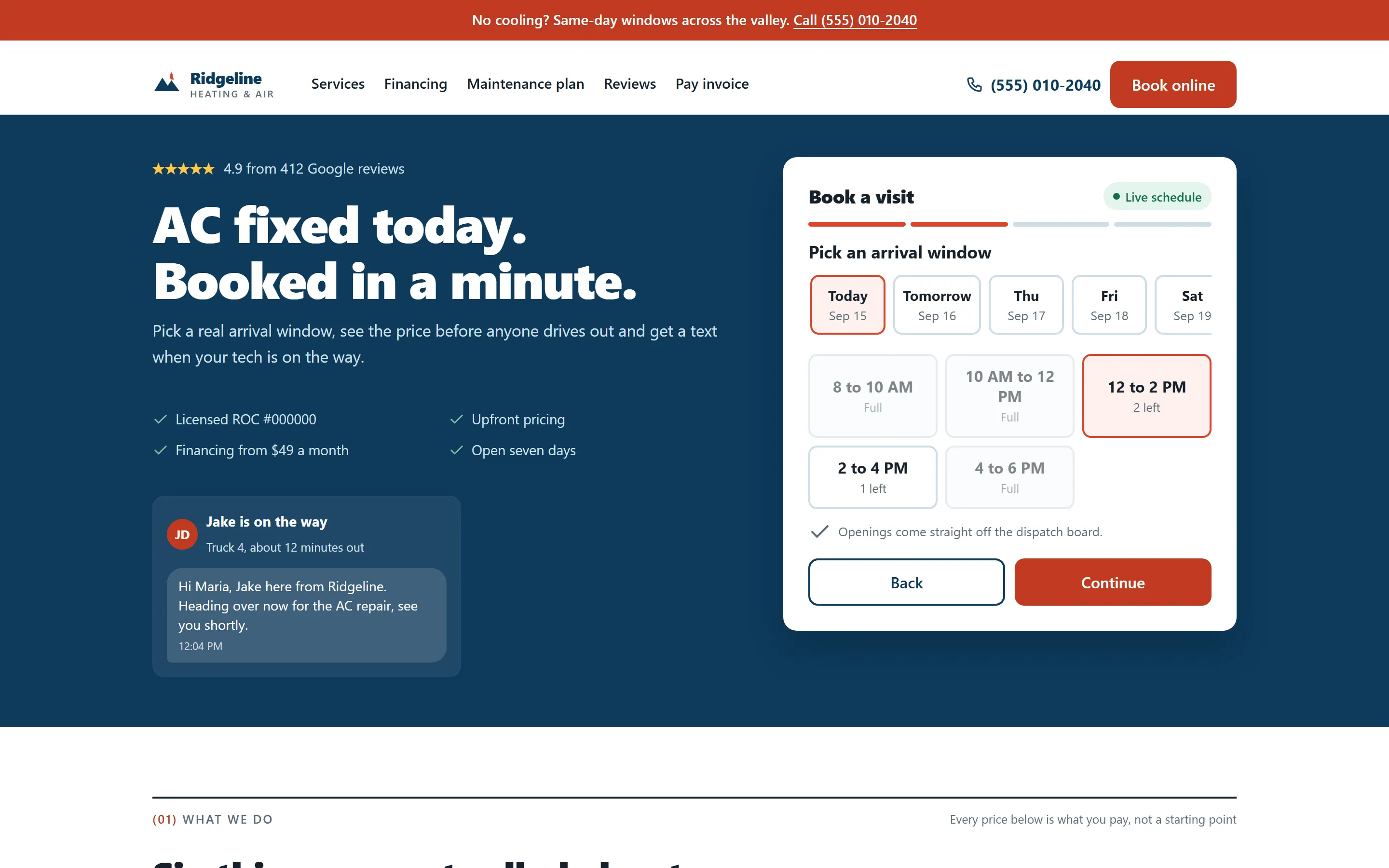
Customers pick a real slot. Your board fills itself.
The arrival windows on the site are the ones your dispatch board actually has. A homeowner picks one at nine at night, and it is on the board before anyone opens the office.
- Windows pulled live from ServiceTitan, Housecall Pro or Jobber
- Full windows show as full, so nobody books a slot you cannot keep
- A small deposit holds the slot and cuts the no-shows
02 · Confirmation
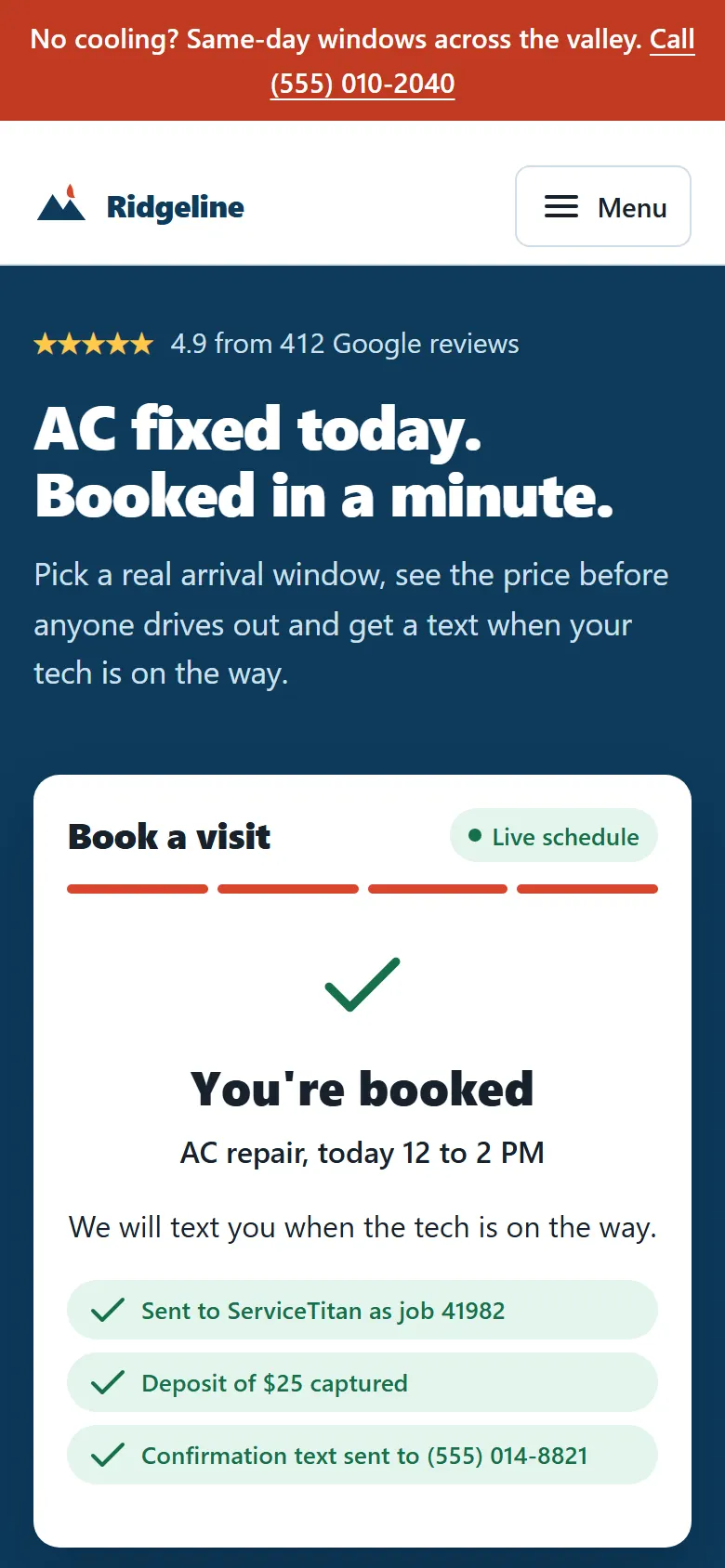
Booked, paid and confirmed before they put the phone down.
The confirmation text goes out the moment the slot is taken, with the price they agreed to. On the day, another text says who is coming and when.
- Deposit captured and applied to the final bill
- Job synced to your software with the customer's details already filled in
- On-the-way text with the tech's name, so nobody watches the window
03 · The owner view
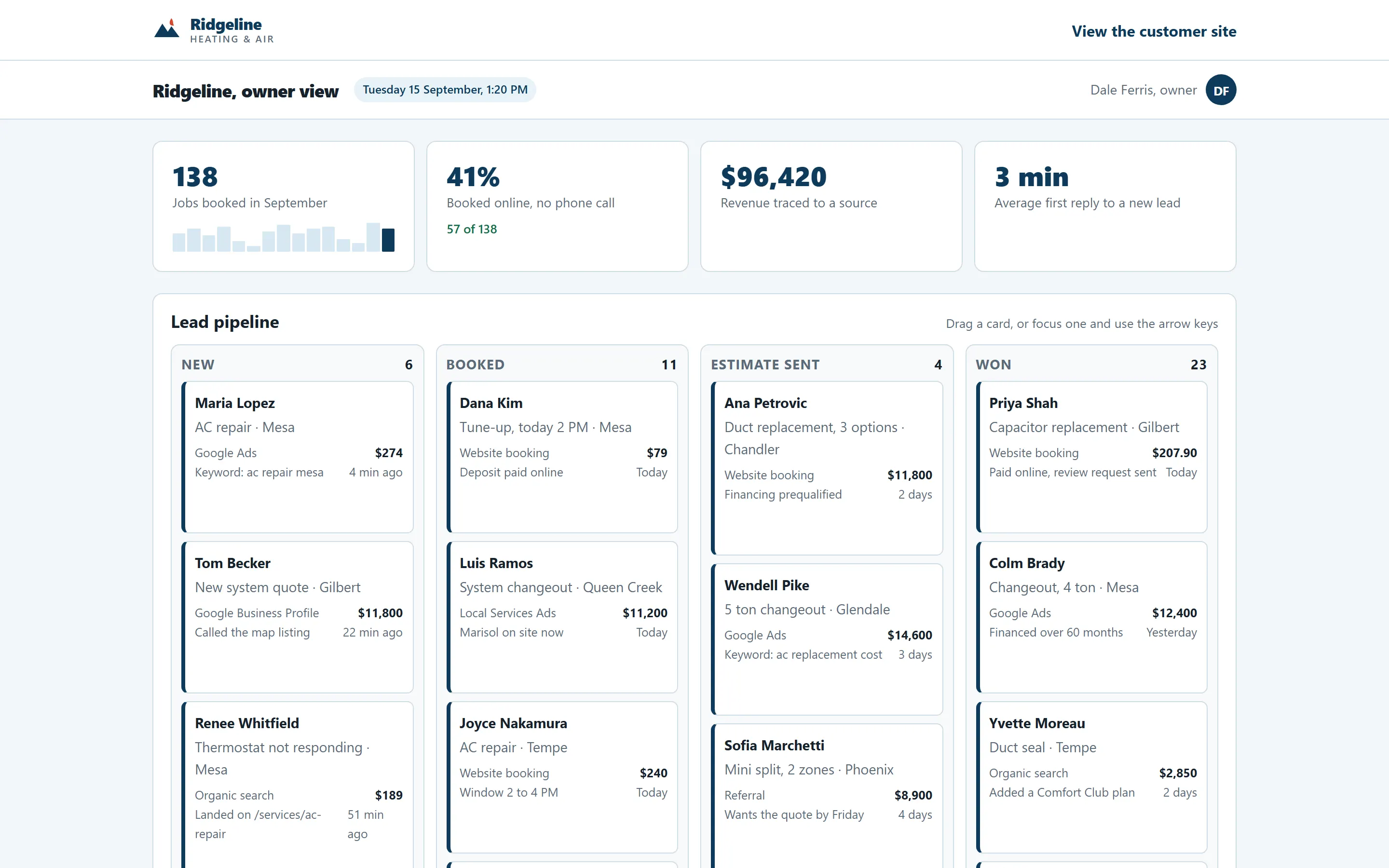
Every lead, call and dollar on one screen.
Calls, forms and bookings land in one pipeline. Each one carries the ad, keyword or listing that produced it, so the month's revenue can be traced back to what you paid for.
- Drag a lead from new to booked to won
- Revenue by source, next to what each source cost
- Every call with its tracked number and the keyword behind it
04 · Payment and financing
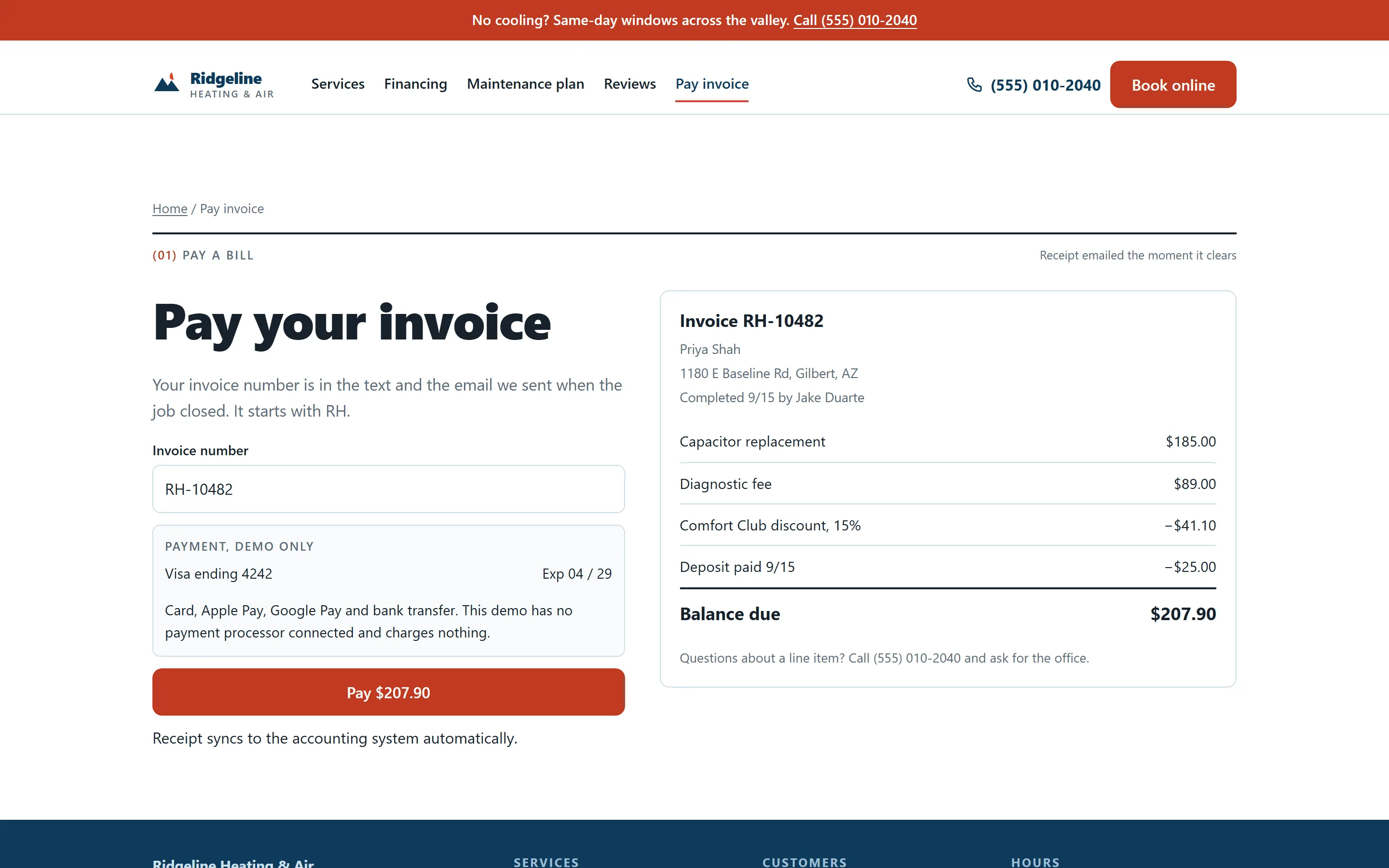
Invoices paid from the driveway.
The invoice arrives by text before the truck has left. Card, Apple Pay or bank transfer, and the receipt lands in your books on its own. For the big jobs, the financing check happens before the visit, not at the kitchen table.
- Pay link by text, receipt straight to QuickBooks
- Deposit already applied, plan discount already taken off
- Soft-check financing with three real monthly numbers
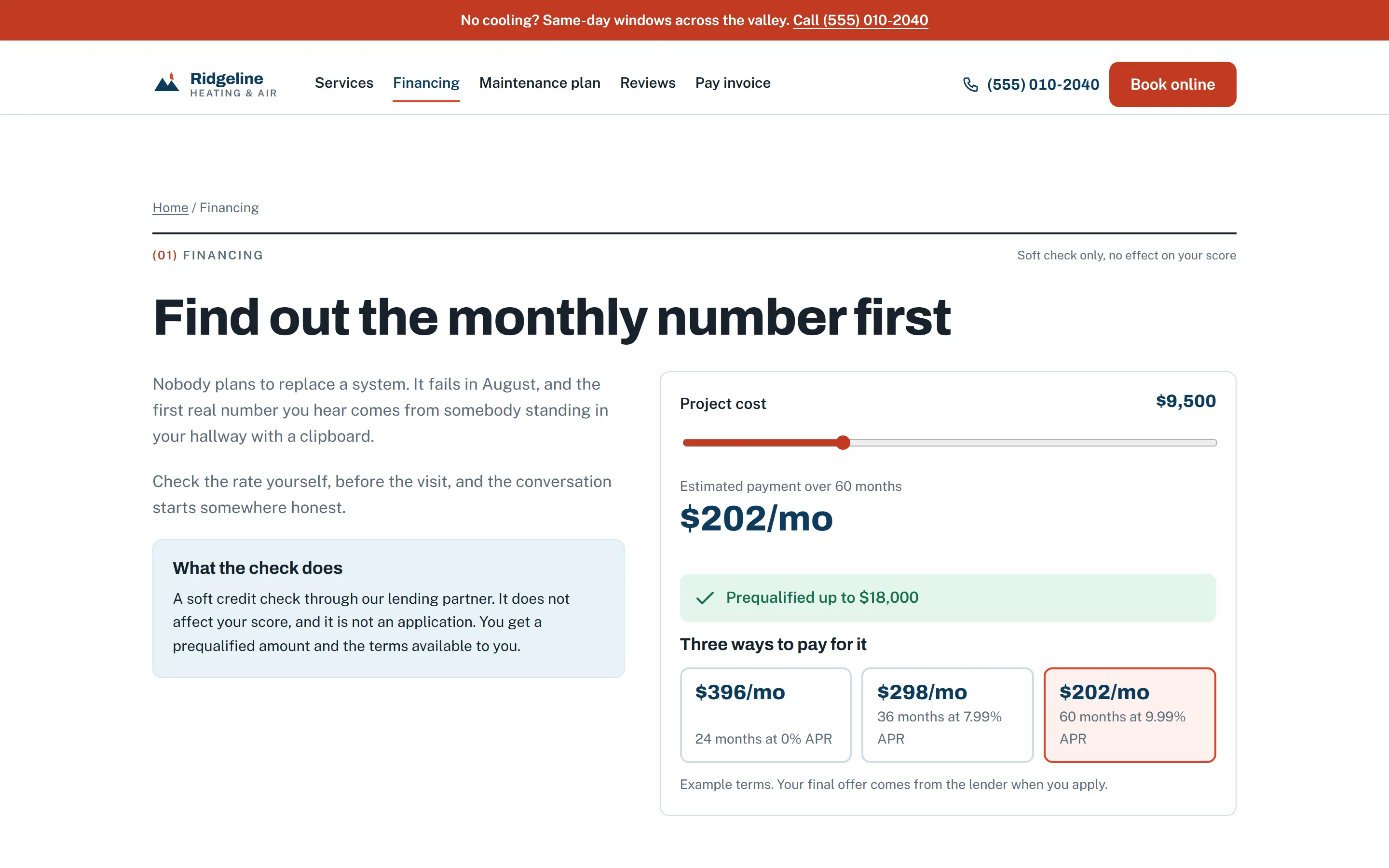
Screens are from a demonstration build with sample data.
(04) How it runs
Live in about three weeks.
One audit call, one build you approve on a staging link, one launch where nothing you already rank for gets lost.

- 1
Audit
A recording by email, or thirty minutes on a call if you prefer. Your site, your software, your ad spend and where the calls go missing.
- 2
Build
We design the pages and wire up your tools. You see it on a staging link and approve it before launch.
- 3
Launch
Redirects, tracking and the booking flow go live together, so nothing you already rank for is lost.
- 4
Report
A monthly page of calls, bookings and revenue by source. Short enough that you will actually read it.
(05) Integrations
Works with the tools you already run.
Nothing here asks you to change software in the middle of a season. Run something that is not listed? If it has an API or a Zapier connection, it can be wired in.
- Field service and CRM
- ServiceTitanHousecall ProJobberFieldEdgeSuccesswareService FusionFieldPulseWorkizKickservHubSpotGoHighLevel
- Calls, listings and reviews
- CallRailGoogle Business ProfileGoogle Local Services AdsCallTrackingMetricsPodiumBirdeyeNiceJobAngiThumbtack
- Payments, financing and scheduling
- StripeSquareQuickBooksWisetackGreenSkySynchronyCalendlyGoogle Calendar
- Tracking and automation
- Google AdsGoogle Analytics 4Google Tag ManagerMeta PixelTwilioZapierMake
(06) Questions
Questions, answered straight.
A few we hear a lot, then the rest. Yours may be different: ask it on a call or by email, and you get the same kind of answer.
“Can it talk to ServiceTitan without me switching anything? My dispatcher would quit.”
Yes.
We connect to what you run: ServiceTitan, Housecall Pro, Jobber and the rest. A booking made on the site at nine at night is on the board when your dispatcher sits down at seven. Nothing about her screen changes.
See the booking screen“Can you tell me which ad actually paid for itself? Not clicks. Jobs.”
Yes.
Every call and form carries the ad, keyword or listing that produced it. At the end of the month you see revenue by source, next to what each source cost, on one screen.
See the owner view“Do I have to pay for the whole thing up front?”
No.
Most owners put the build on the care plan and pay nothing up front: one monthly fee covers the build, hosting and upkeep, and after 18 months the site is yours outright. If you would rather pay the quote once and own it from launch day, that works too. Same build either way.
More questions
Do I have to switch from ServiceTitan, Housecall Pro or Jobber?
No. We connect to what you run today. Switching field service software mid-season is a bad idea, and we are not going to suggest it.
Do I have to get on a call for the audit?
No. Send the form and the recording arrives by email. A thirty-minute call is there if you would rather go through it together. Skip the audit entirely if you already know what you need and email us instead.
What do you need from me to start a build?
Access to your current site and hosting if you have them, a login or API key for your field service software, your logo, any photos you have, and a list of the services and cities you want pages for. Starting from nothing is fine too, and in some ways easier.
Who owns the website?
You do. Pay the quote up front and it is yours from launch day. Take the no-upfront route and it is yours after 18 months on the care plan. Either way the domain, the content, the customer data and the analytics accounts are in your name from the start.
How long does it take?
About three weeks from the audit call to launch, for a site with online booking and call tracking. Deeper CRM and payment work can add a week.
What happens to my current site and its rankings?
Every existing page keeps its URL or gets a permanent redirect to its closest match, so the traffic you already earn carries over instead of starting again.
I like my current site. Can you keep it and add the booking and tracking?
Often, yes. The audit says which: if the site is sound, we wire booking, call tracking and the CRM sync into it. If it is slow or hard to change, we say so and quote a rebuild instead.
Can it take deposits and payments?
Yes. A small deposit at booking holds the slot and cuts no-shows, invoices go out by text and get paid from a phone, and the receipt lands in QuickBooks. Stripe or Square, your choice.
Is the price really fixed?
Yes. You get the number in writing after the audit, and it moves only if you ask for something that was not in the scope. No hourly billing. Pay it once, or spread it across the care plan with nothing up front, whichever suits the season.
What does the care plan cover?
Hosting, backups, updates, small changes and a monthly page showing calls, bookings and revenue by source. Anything broken gets a same-day response. If you chose the no-upfront route, the build itself is in there too, and after 18 months the plan is month to month and the site is yours.
What if something breaks after launch?
On the care plan, we fix it the same day. Without it, you email us and we quote the fix. Either way you are never locked out of your own site.
Do you only work with HVAC?
No. Plumbers, roofers and electricians get the same build, with the same booking, follow-up and call tracking. Their page is under Contractor websites in the menu.
(08) Next step
See what your site is missing.
A free audit of your site, your listing and your booking flow. We email a short recording of what we found, and you decide whether any of it is worth fixing.